

If you want customers to find you, maps are non-negotiable. This guide walks you through claiming, verifying and optimising a Google Maps and Apple Maps listing. It’s written for busy UK small-business owners, with short paragraphs and bullets of the key actions you can take right away.
Why listing on maps matters for local search
Being on Google Maps and Apple Maps means people can find your phone number, opening times, directions and reviews without scrolling through search results. That visibility often turns into calls and bookings. If your listing is wrong, customers will either not find you or pick a competitor who’s shown up correctly.
Key points:
- Maps drive direct actions: calls, direction requests, bookings.
- Correct listings reduce friction and phone enquiries increase.
- A verified listing gives you control over how your business appears.
Step 1 — Prepare your NAP and business details
Before you touch any dashboard, gather the facts. Decide the exact business name you’ll use, your address (or service-area details), the phone number you’ll publish, your main categories, core services, opening hours and a short description. Consistency matters — use the same format across your website, directories and socials.
Key points:
- Choose a single, consistent business name and phone number (NAP).
- Prepare address, opening hours, service areas and a short description.
- Have 3–5 good photos ready: exterior, interior, staff/action shots, product/service.
Step 2 — Claim and verify your Google Business Profile (Google Maps)
Google Business Profile is free and covers Search and Maps. If a profile exists, request ownership; if not, create one and follow verification steps. Google uses a few verification methods (postcard, phone, email, video) depending on business type and region. For service-area businesses you can hide your address and set service areas instead.
Key points:
- Go to Google Business Profile and either claim or create your listing.
- Verify using the method Google offers (postcard is common; some businesses get phone/email/video options)
If you’re a service-area business, set service areas in the Location settings rather than a public address.
How to optimise after verification (quick wins)
- Add your categories and a concise services list.
- Add clear opening hours and special hours for holidays.
- Upload the photos you prepared (logo, cover, interior, staff, work in progress).
- Add a short, factual business description that includes a key local phrase (e.g., “Plumber in Totnes”).
- Use posts to highlight offers, events or updates.
Step 3 — Claim and verify Apple Maps listing (Apple Business Connect)
Apple Business Connect (previously Apple Maps Connect) is Apple’s portal to manage how your business appears across Apple Maps, Siri and Wallet. Sign up with an Apple ID, claim or add your location, and verify ownership. Apple’s portal lets you manage place cards, photos and more so your listing looks great for iPhone users.
Key points:
- Sign in to Apple Business Connect and add or claim your location.
- Provide accurate name, address, phone, categories and opening times.
- Add good photos and a short description; Apple shows these in Maps and Siri results.
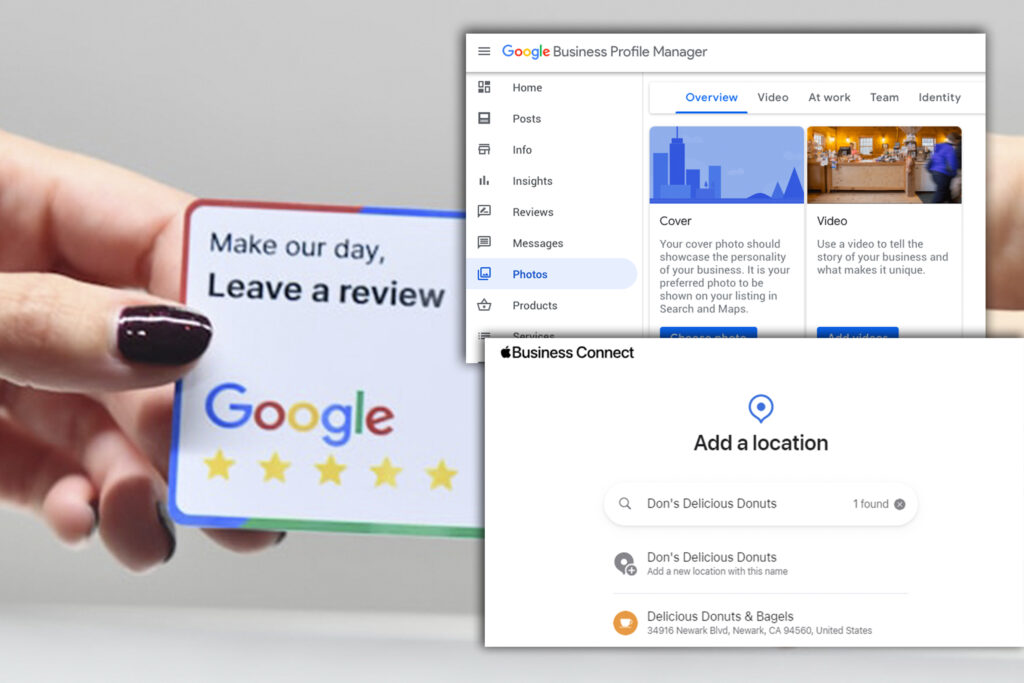
Step 4 — Optimise your listings (photos, categories, services)
Once verified, don’t treat listings as one-and-done. Add categories and services that match real searches. Photos are key — they increase clicks. Use clear category choices (Google’s category list and Apple categories), and keep your main service described in plain English on both profiles so algorithms can match user queries.
Key points:
- Pick accurate primary and secondary categories.
- Upload high-quality photos; include a map pin photo and a team shot.
- Keep service descriptions short, local and factual (price bands, turnaround times).
- Consistently use the same NAP across all platforms.
Step 5 — Manage reviews and feedback (the right way)
Reviews influence both visibility and conversions. Ask for reviews after service, respond quickly, and treat feedback professionally. In the UK, advertising rules require that marketers hold documentary evidence showing a testimonial is genuine if it’s used in marketing, so don’t pay for reviews or gate who can leave one.
Key points:
- Ask customers for reviews via SMS, email or a link on your invoice.
- Respond to reviews — thank positives, address negatives offline if possible.
- Do not incentivise positive reviews; keep records if you use testimonials in ads.
Common problems and how to fix them
You’ll run into a few predictable issues: duplicate listings, old addresses, verification delays, or listings flagged as closed. Fix duplicates by requesting ownership and merging where possible, update addresses in the dashboard, and follow the verification prompts exactly. If you can’t verify, Google and Apple support pages have step-by-step guidance and escalation paths.
Key points:
- Duplicate listings: request ownership, then merge or flag the duplicate.
- Wrong address or opening times: edit the profile and allow up to 48 hours for changes to appear.
- Verification taking too long: check Google/Apple help and follow their document/video verification methods.

Local checklist: what to do this week (quick, actionable)
If you do nothing else, do these five things to get found faster and avoid common mistakes.
- Claim or create your Google Business Profile and verify it.
- Claim or add your location on Apple Business Connect and verify.
- Ensure NAP is identical on your website footer, directory listings and both maps profiles.
- Add 3–5 high-quality photos and a short service description with a local phrase.
- Ask two recent customers for reviews and respond to any new reviews.
What to measure and how often
Track metrics monthly to see whether your maps work is actually bringing business. Focus on outcomes: calls, bookings, and direction requests, not just impressions.
Measure these (monthly):
- Google Business Profile: phone calls, website clicks, direction requests (actions)
- Apple Maps: place card views and requests (check Apple Business Connect
insights). - Reviews: number of new reviews and average rating.
- Local conversions: calls/bookings originating from the maps listing.
- Duplicate issues or incorrect details flagged (should be zero).
Compliance & privacy (UK-specific)
When you use tracking, email follow-ups or display testimonials, follow UK rules. Get consent for non-essential cookies and keep a clear cookie policy. Keep documentary evidence for testimonials used in marketing. The ICO and ASA provide practical guidance on cookies and endorsements.
Key points:
- Use consent for tracking and keep consent records.
- Link to a clear cookie and privacy policy in the footer.
- Keep documentary evidence for any testimonial you use in marketing.
related Bazuru reading
- Read our practical playbook on local marketing: Marketing Strategies for Local Businesses.
- For review best practice: Reviews that Move the Needle
Get In Touch
If you’re searching for a digital marketing company to help drive results across paid ads, SEO, and social, get in touch: https://bazuru.com/contact/
Disclaimer
The information in this article is for general guidance only. Results will vary according to business, market and execution.


